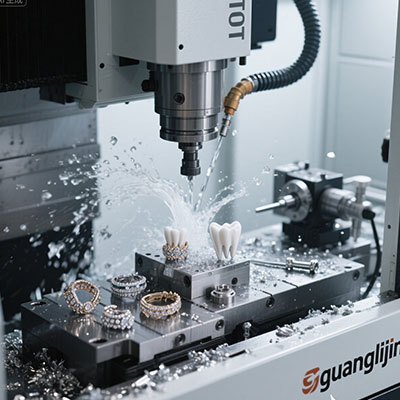
Buying a machine is the easy part. Turning it into a hub that the shop actually uses takes planning. The machine arrives. The crate opens. Then someone asks a question nobody prepared for. Who runs it, and with what program?
A 4th axis cnc machine adds a rotary axis to the standard three linear movements. It handles multi-face parts and cylindrical features in fewer setups . That capability only matters if the shop can program it, fixture it, and verify it.
This guide covers the access plan that turns a purchase into a working hub. It explains the decisions that belong before delivery, the mistakes that stall adoption, and the sequence that gets parts on the table.
The Hub Access Problem: Capability Without a Workflow
A 4-axis machine requires four things to produce parts. A trained operator. A CAM post-processor that outputs the A axis correctly. A workholding plan that clears the rotary envelope. A verification method that catches errors before the customer does.
If any of those four is missing, the machine sits. It is not broken. It is waiting for a workflow that never got built.
Therefore, hub access planning should start weeks before delivery. The CAM module, the post, and the training belong on the calendar alongside the shipping date.
Specifically, a 4-axis post-processor needs the machine’s kinematic model and controller details. A generic downloaded post produces unpredictable A-axis motion. The shop that skips post verification pays for it in scrapped parts.
Project A vs Project B: Two Hub Access Plans Compared
We have watched both plans play out in shops adding a rotary machine. The difference appeared in the first month.
| Plan Factor | Project A: Machine-First Access | Project B: Workflow-First Access |
|---|---|---|
| CAM module | Existing 3-axis license | 4-axis module licensed before delivery |
| Post-processor | Generic download, untested | Verified against the specific machine and controller |
| Operator training | On-the-job, ad hoc | Structured course before first production part |
| Workholding | Existing vises | Chuck and fixtures designed for rotary clearance |
| Verification | Relies on operator experience | First-article test cylinder with measured results |
| Time to first sellable part | Three to six months of trial and error | Four to eight weeks with a plan |
Project A wins on capital outlay. It loses on utilization. A machine running generic posts and untrained operators produces scrap and frustration.
Project B costs more upfront. The CAM module and training appear as line items. They turn the machine into a hub that produces sellable parts within two months.
Specifically, a study on multi-axis dental milling found that controller and CAM limitations often decided real-world fit more than the machine frame did . The pattern holds for general rotary work. The workflow, not the casting, decides the outcome.
⚠ Attention: Three Hub Access Mistakes
Mistake 1: Licensing the CAM module after the machine arrives. A 4-axis module is a separate license in most CAM packages. Order it before delivery. A machine without software is a sculpture.
Mistake 2: Trusting a generic post-processor. Post-processing for rotary machines requires the machine’s kinematic model and controller details. A downloaded post that has not been verified on your machine produces unpredictable motion and collision risk.
Mistake 3: Skipping the first-article verification. The first part off a new rotary setup should be measured, not shipped. A test cylinder measured at four points confirms the centerline and backlash before production begins.
Our Team’s 2025 Hub Access Case
We helped a shop bring a 4-axis machine into production in early 2025. The machine arrived on schedule. The CAM module arrived two weeks later. The shop lost fourteen days of production time.
The first program ran with a downloaded post. The A-axis output was off by a factor of ten. The part scrapped. We rebuilt the post with the machine builder’s kinematic data. The next part passed.
The lesson was not about the machine brand. It was about sequencing. The CAM module and the verified post belonged before the delivery date, not after.
Step-by-Step: Building the Hub Access Plan
Follow these five steps before the machine lands.
Step 1 — Classify the parts the machine will run. List the features that need rotary motion. Separate indexed features from continuous ones. The classification decides the CAM module and the post-processor requirements.
Step 2 — License the CAM module and order the post-processor. Confirm delivery dates against the machine install date. Provide the machine builder with the kinematic model and controller details. A 4th axis cnc machine hub plan that sequences these correctly avoids idle weeks.
Step 3 — Schedule operator and programmer training. Cover the CAM module, the post-processor workflow, and the rotary setup procedure. Include the steps-per-degree calculation and the centerline alignment method. Training should finish before the first production job.
Step 4 — Design the rotary workholding and clearance plan. Standard vises do not clear the rotary envelope. Specify chuck size, maximum overhang, and tailstock requirements. Confirm clearance between the fixture and the tool path.
Step 5 — Run a first-article test cylinder with measurement. Cut the test part with the verified post. Measure wall thickness at four points. Compare the results to the tolerance band. Document the outcome before releasing the machine to production.
LSI Terms for Hub Access Planning
Use these phrases in the planning document and the vendor conversations:
- Verified 4-axis post-processor — The machine-specific translation layer that makes CAM output safe.
- Indexed vs continuous rotary workflow — The distinction that drives CAM module selection.
- Rotary workholding clearance — The fixture design requirement that prevents collisions.
- Steps-per-degree setup procedure — The calculation that aligns controller motion with the rotary table.
- First-article test cylinder — The verification method that confirms centerline and backlash.
Frequently Searched Questions About 4th Axis CNC Machine Hub Access
What do I need to plan before a 4th axis CNC machine arrives? Plan the CAM module license, a verified post-processor, operator training, rotary workholding, and a first-article verification method. Those five items turn the machine into a working hub. Without them, the machine sits idle .
Do I need a separate CAM module for 4-axis machining? In most CAM packages, yes. Simultaneous or indexed 4-axis toolpaths require a module that standard 3-axis licenses do not include. Order the module before the machine ships.
How long does it take to bring a 4th axis CNC machine into production? With a verified post, trained operators, and a workholding plan, a shop can reach first sellable parts in four to eight weeks. Without those elements, ramp-up stretches to three to six months of trial and error.
Why does a 4-axis machine need a custom post-processor? The post-processor translates CAM toolpaths into the specific A-axis commands your controller expects. A generic post may output the wrong units or the wrong axis convention. Verification against the machine is mandatory.
What is the first part to cut on a new 4-axis machine? A test cylinder. Cut it with the verified post at reduced feed. Measure wall thickness at four points. The result confirms the centerline alignment and backlash before production work begins.
Checklist: Before the Machine Lands
☐ Part features classified as indexed or continuous
☐ CAM module licensed with delivery date confirmed
☐ Post-processor commissioned with the machine builder
☐ Post verified on a simple indexed part
☐ Operator and programmer training scheduled
☐ Steps-per-degree procedure documented
☐ Rotary workholding specified with clearance checked
☐ Chuck size and overhang limit defined
☐ First-article test cylinder plan written
☐ Measurement method for the test cylinder defined
The 4th axis cnc machine hub access plan succeeds when the software, the post, and the training arrive before the first production job. Sequence the steps. Verify the post. Train the operators. The machine will earn its place.