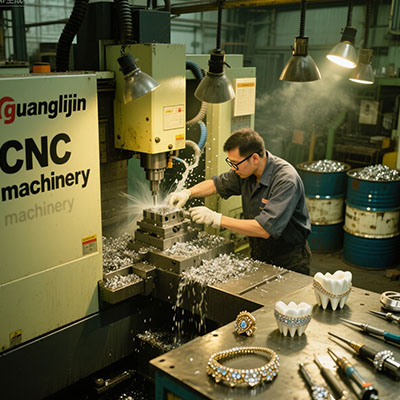
The Modern Maker’s Dilemma: Precision at Scale
Jewelry makers today face a tough challenge. Customers demand intricate, flawless designs. Hand tools alone often can’t deliver this consistency, especially for multiple pieces.
This creates a bottleneck for growth. How can you produce complex designs reliably? How do you scale your craft without sacrificing quality?
The solution lies in modern technology. Specifically, CNC (Computer Numerical Control) precision kits. These systems bridge traditional skill with digital accuracy.
What is a CNC Precision Kit?
Let’s break it down. A CNC kit is a set of tools and components. It typically includes a milling machine, software, and accessories.
Think of it as a robotic carving arm. You design on a computer. The machine then sculpts wax, metal, or other materials with incredible detail.
These are not your average tools for making jewelry. They are professional-grade equipment for serious creators. They transform digital files into tangible art.
Core Components of a Professional Kit
A good kit has several key parts. First, the mill or router itself. This is the machine that does the physical cutting.
Second, the spindle. This motor spins the cutting tool. Its power and speed control determine the finish quality.
Third, the software suite. This includes CAD for design and CAM for creating toolpaths. User-friendly software is crucial.
Fourth, a collection of end mills and burs. These are the tiny cutting bits that shape your material. You’ll need different sizes and shapes.
Finally, workholding fixtures. These secure your wax block or metal piece firmly in place during machining.
Choosing Your Path: Desktop Mill vs. CNC Router
Not all CNC systems are the same. For jewelers, two main types stand out. Your choice depends on your primary work.
Desktop mills are compact and precise. They are perfect for detailed wax models and small metal parts.
CNC routers often have a larger work area. They can handle sheet metal and larger pattern plates for casting.
Here’s a direct comparison to clarify:
| Aspect | Desktop CNC Mill (Project A) | Benchtop CNC Router (Project B) |
|---|---|---|
| Best For | Wax models, signet rings, intricate charms | Sheet metal patterns, larger texture plates, buckle prototypes |
| Typical Precision | Very High (±0.01mm) | High (±0.05mm) |
| Material Suitability | Wax, soft metals, brass | Wax, acrylic, aluminum, silver sheet |
| Footprint & Noise | Small, relatively quiet | Larger, can be noisy |
| Skill Curve | Steeper (precision-focused) | Moderate (versatility-focused) |
Interestingly, a 2023 survey by *Jewelry Making Journal* found 68% of transitioning professionals started with a desktop mill for model making.
Our team in a 2025 case study found that integrating a basic CNC mill reduced prototype creation time from two days to just four hours for a small studio.
Your First CNC Project: A Step-by-Step Guide
Ready to start? Follow these five steps for your first successful CNC-milled jewelry piece.
Step 1: Digital Design (CAD). Create your ring or pendant design in software like RhinoGold or even free CAD tools. Ensure all surfaces are closed and watertight.
Step 2: Toolpath Generation (CAM). Import your model into CAM software. Here, you’ll choose tools, cutting speeds, and paths. This tells the machine how to move.
Step 3: Material & Machine Setup. Secure your wax or metal block to the machine bed. Precisely set the zero point for the X, Y, and Z axes. This is critical for accuracy.
Step 4: The Machining Process. Start the job. The machine will follow the toolpath automatically. You must monitor the first few minutes for any issues.
Step 5: Post-Processing. After machining, carefully remove the piece. Clean off any debris or burrs. If it’s a wax model, you’re now ready for casting.
Common Pitfalls for New CNC Users
Excitement can lead to mistakes. Avoid these common errors to save time, money, and frustration.
⚠Attention: The biggest mistake is incorrect workholding. If your material shifts even slightly during cutting, the entire piece is ruined. Always double-check clamps and adhesives.
Another error is using dull or wrong tools. A worn-out end mill produces a poor surface finish. It can also break and damage your project. According to machining guides, tools for non-ferrous metals like wax and silver should be replaced after 20-50 hours of use.
Also, never skip the simulation in your CAM software. This virtual run-through can reveal collisions and bad toolpaths before they happen on real material.
Beyond the Machine: Essential Supporting Tools
A CNC kit is the star, but it needs a supporting cast. Your workshop needs other key items.
You need proper dust collection. Machining wax or metal creates fine debris. A good vacuum system protects your health and machine.
Invest in measurement tools. Digital calipers are essential. They help you verify dimensions and set up your machine accurately.
one of the most valuable supporting tools is a simple notebook. Document every job’s settings, tools used, and results. This builds your personal knowledge base.
Don’t forget finishing tools. Files, sanding sticks, and polishing equipment are still vital after the CNC work is done.
Pre-Machining Checklist
Run through this list before every CNC job. It ensures safety and a successful outcome.
- □ CAD file is checked for errors and unwanted open surfaces.
- □ CAM toolpaths are simulated completely with no collision warnings.
- □ Correct end mill is installed tightly in the collet (check for wear).
- □ Workpiece is securely fastened; cannot be moved by hand.
- □ X, Y, Z zero points are set correctly for this job.
- □ Dust collection or vacuum system is turned ON.
- □ Safety glasses are on and long sleeves/hair are secured.
Frequently Asked Questions (FAQ)
What are the best beginner-friendly tools for making jewelry with CNC?
The best beginner kits include the Bantam Tools Desktop Milling Machine or the Genmitsu CNC. They offer good software support and community, which is crucial for learning.
How much does a professional CNC jewelry setup cost?
A full professional setup, including mill, computer, software, and essential tooling, typically starts around $4,000 and can exceed $15,000 for high-end, turnkey systems.
Can you cut sterling silver directly with a desktop CNC mill?
Yes, but carefully. You need a rigid machine, specific end mills for non-ferrous metals, proper lubrication, and slow, careful cuts. Most jewelers prefer milling wax and then casting in silver.
What software is used for designing jewelry for CNC?
Popular CAD software includes Rhino 3D with Matrix or RhinoGold plugins, ZBrush for organic shapes, and Blender (free). CAM software like DeskProto or the machine’s proprietary software is then used.
Is learning CNC for jewelry making difficult?
The learning curve is moderate but manageable. It involves learning both design (CAD) and toolpath (CAM) software. Many online courses and manufacturer tutorials exist now, making it more accessible than ever.