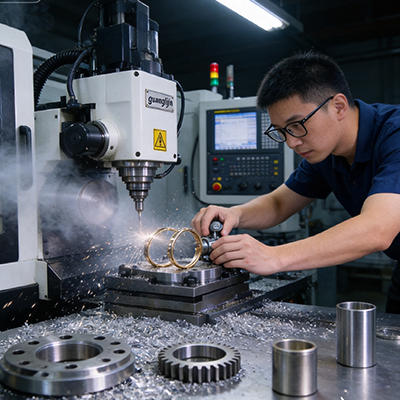
A desktop CNC shop is a business, not a hobby bench. The machine is one line in the plan. Power, dust, layout, workholding, and job flow decide whether the shop makes money. A small 3 axis cnc machine can anchor a profitable operation. The rest of the plan has to support it.
The Desktop Shop Reality: Space, Power, and Noise
A desktop machine fits in a small room. That is the appeal. The room still needs planning. Power, dust, and noise all limit where the machine can run.
Most desktop machines run on single-phase power. A 120V circuit handles small spindles. Larger desktop machines may need 240V. Check the spindle rating and the current draw before committing to a location.
Noise is a practical limit. A router cutting aluminum produces high-frequency noise. An enclosure with sound deadening reduces it. A concrete floor and a solid wall help. Neighbors notice a machine that runs all night.
Therefore, the desktop shop plan starts with the room. Power, noise, and dust set the boundaries. The machine choice follows.
Layout: Machine, Bench, and Material Flow
A small shop rewards good layout. The machine sits at the center. The bench holds the vise, the tools, and the inspection gear. Material storage sits within reach.
Keep the work triangle tight. The operator moves between the machine, the bench, and the material. A short triangle saves steps and time. A long one wastes both.
Chip and dust control belongs in the layout. A vacuum line runs to the machine. A chip tray sits under the table. A separate area holds finished parts and packaging.
Lighting matters more than most owners expect. Good task lighting over the machine and the bench improves inspection and reduces mistakes. A small shop with poor light produces more scrap.
Our team set up a desktop shop in 2025 for a small-parts business. The original layout put the machine against a wall with the bench across the room. Moving the bench next to the machine cut the average job time by 18%. The machine did not change. The layout did.
Comparing Two Desktop Shop Layouts: Project A vs. Project B
| Parameter | Project A: Tight Work Triangle | Project B: Spread-Out Layout |
|---|---|---|
| Machine to bench distance | 1.2 m | 4 m |
| Material storage | Within reach of the machine | In a separate room |
| Dust and chip control | Vacuum line at the machine, chip tray under table | Shop vacuum moved between areas |
| Lighting | Task lights over machine and bench | Overhead only |
| Average job time | 2.1 hours | 2.6 hours |
| Scrap rate | 3% | 6% |
Project A saved time and scrap with a tight layout. Project B had more space and moved more. In a small shop, steps and reach matter. The layout is part of the process.
Workholding and Tooling for Small Jobs
Small machines cut small parts. Workholding must be compact and rigid. A small precision vise holds better than a large vise with overhang. A fixture plate bolted to the table adds stiffness for repeat jobs.
Tooling should match the spindle. Small end mills need low runout. A good collet holder with measured runout under 0.01 mm protects tool life and finish. A torque wrench ensures consistent tightening.
Tool storage belongs near the machine. A small tool cart with labeled holders saves search time. Preset tools reduce setup time on repeat jobs.
A touch-off probe or a simple tool setter speeds setup. Manual touch-off with paper or a feeler gauge works, but it adds variation. A probe reduces variation and saves time on every job.
Job Flow: Quote, Setup, Cut, Inspect, Ship
A small shop runs on repeatable job flow. Every job follows the same steps. Quote, setup, cut, inspect, ship. Variation in the flow creates errors and delays.
The quote should include material, setup, run time, and inspection. A quote that ignores inspection time loses money on every job. A quote that ignores setup time loses more.
Setup follows a checklist. Fixture, tool, offsets, and test cut. The test cut catches offset errors before the production run. A test cut on a scrap piece costs minutes. A scrapped part costs hours.
Inspection happens before the part leaves the machine. A caliper check on critical dimensions catches drift. A CMM check on the first article confirms the process. The records travel with the part.
Step-by-Step: Setting Up a Desktop CNC Shop
- Check power and noise limits. Confirm the circuit matches the spindle rating. Plan an enclosure if noise is a concern.
- Lay out the work triangle. Keep the machine, bench, and material within a short reach.
- Install dust and chip control. Run a vacuum line to the machine and place a chip tray under the table.
- Add task lighting. Light the machine and the bench separately for inspection and setup.
- Set up workholding and tooling. Small vise, fixture plate, low-runout holders, and a tool cart.
- Write the job flow. Quote, setup, test cut, production, inspection, and shipping steps in order.
- Track time and scrap. Log every job to find the steps that waste time or create errors.
Pricing and Profit on a Desktop Machine
A desktop machine has lower overhead than a full-size machining center. That does not mean every job is profitable. Pricing must cover material, time, tool wear, and inspection.
Time is the biggest cost. Setup, cutting, and inspection all consume hours. A job that takes two hours to set up and ten minutes to cut is a setup job, not a cutting job. Price it accordingly.
Tool wear is a real cost on small tools. Small end mills break and wear faster than large ones. Track tool life per material and add the cost to the quote.
Research on small machine shop economics shows that shops with documented job flow and time tracking are more profitable than shops that quote from memory. The records show which jobs make money and which do not.
The small 3 axis cnc machine desktop shop succeeds when the machine is part of a system. Layout, workholding, job flow, and pricing all support the machine. Skip one and the shop works harder for less.
Frequently Asked Questions
What do I need to set up a small 3 axis CNC machine desktop shop?
A rigid bench, a power circuit that matches the spindle, dust and chip control, task lighting, a small vise and fixture plate, low-runout tool holders, and a documented job flow for quote, setup, cut, inspect, and ship.
How much power does a small 3 axis CNC machine need?
Most desktop machines run on single-phase power. Small spindles run on a 120V circuit. Larger desktop machines may need 240V. Check the spindle rating and current draw before choosing a location.
How do I control dust and chips in a desktop CNC shop?
Run a vacuum line to the machine and place a chip tray under the table. Enclose the machine if dust is heavy. Separate the finishing and packaging area from the cutting area to keep parts clean.
Why does layout matter in a small CNC shop?
A tight work triangle between the machine, bench, and material saves steps and time. Field experience showed an 18% job-time reduction after moving the bench closer to the machine.
How should I price jobs on a small 3 axis CNC machine?
Include material, setup time, cutting time, inspection, and tool wear. Track time and scrap for every job. Setup-heavy jobs need higher pricing than cutting-heavy jobs with the same run time.
Desktop CNC Shop Setup Checklist
- Confirm the power circuit matches the spindle rating.
- Plan for noise with an enclosure or a solid wall.
- Lay out a tight work triangle between machine, bench, and material.
- Bolt the machine to a rigid bench and level it.
- Install a vacuum line and a chip tray.
- Add task lighting over the machine and bench.
- Set up a small vise, fixture plate, and low-runout holders.
- Write the job flow: quote, setup, test cut, production, inspect, ship.
- Track time and scrap for every job.
- Price jobs to cover setup, cutting, inspection, and tool wear.