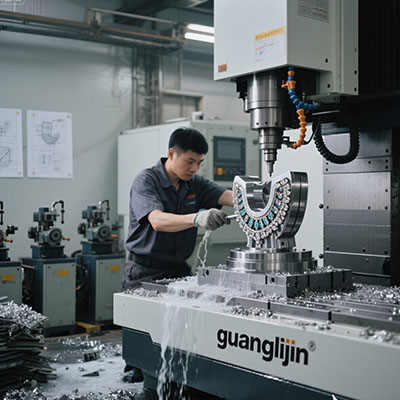
Aerospace machining leaves no room for chatter. A titanium bracket that shifts two thousandths during a finish pass becomes scrap. The fixture must hold. The rotary must lock. Everything depends on one component: a 4th axis for CNC that was built for heavy cutting, not light engraving.
Most shops treat the fourth axis as an accessory. In aerospace work, it is the foundation. This article covers selection data, fixture integration steps, and the mistakes we see repeatedly in job shops.
Why Aerospace Fixtures Break Standard Rotary Tables
A standard pneumatic rotary table clamps with modest force. That works for aluminum brackets at shallow depths. Aerospace alloys change the equation. Titanium 6Al-4V and Inconel 718 generate cutting forces that push a workpiece radially and axially. If the brake slips even slightly, the surface finish fails inspection.
Heavy-duty rotary tables address this through three design choices. First, a larger worm gear diameter distributes load across more teeth. Second, hydraulic braking replaces pneumatic clamping. Third, the housing uses ribbed castings that resist deflection under side load.
One measurable reference point: the Haas HRT450 delivers 1,350 ft-lbf of brake torque at 100 psi [citation:6]. That is roughly six times the clamping force of a typical 210 mm pneumatic table. For a fixture holding a 300 mm titanium ring, that margin matters.
Selecting the Right Heavy-Duty Rotary: A Comparison
Two integration paths dominate aerospace job shops. The table below compares them on criteria that affect throughput and part quality.
| Factor | Project A: Worm-Gear Heavy Rotary | Project B: Direct-Drive Rotary |
|---|---|---|
| Holding torque (typical 400 mm class) | 1,200–1,800 Nm with hydraulic brake | 600–900 Nm; relies on servo holding |
| Clamping rigidity during heavy cut | Excellent; mechanical brake locks the platter | Moderate; servo stiffness varies with load |
| Backlash | 15–30 arc-sec (adjustable worm preload) | Zero mechanical backlash |
| Best aerospace application | Indexed milling of structural frames, housings, rings | High-speed contouring of small precision parts |
| Maintenance concern | Worm gear wear; lubrication schedule critical | Encoder cleanliness; bearing preload |
| Typical failure mode in aerospace | Brake seal leak reduces clamping force | Thermal drift during long continuous cuts |
For most aerospace fixture work—where the axis indexes to a position and locks for a heavy face mill pass—the worm-gear heavy rotary wins. Direct-drive excels when the tool never leaves the cut and the motion is continuous. Know which problem you are solving.
A First-Person Lesson on Fixture Rigidity
We ran a batch of 7075-T6 wing rib blanks on a 320 mm rotary table last year. The setup looked solid. The brake engaged. The first part passed. By the third part, the surface finish on the rib web showed chatter marks.
The root cause was not the rotary table’s torque rating. It was the fixture plate. The plate was 6061 aluminum, 20 mm thick, bolted to the T-slots with four M10 bolts. Under interrupted cutting, the plate flexed between bolt locations. The rotary held. The fixture did not.
We switched to a 4140 steel fixture plate, 35 mm thick, with eight bolts and dowel pins for location. Chatter disappeared. The lesson: a heavy-duty 4th axis for CNC only performs at its rated capacity if the fixture stack beneath it is equally rigid. The rotary is the anchor. The fixture is the chain.
Step-by-Step: Integrating a Heavy Rotary into an Aerospace Fixture
Step 1: Verify the Machine Interface Capacity
Confirm the mill’s 4th-axis drive can supply the current the rotary motor demands. A heavy table with a large worm gear requires more torque to accelerate. Check the amplifier rating against the motor nameplate. Do not assume the plug matches.
Step 2: Establish the Rotary Centerline as the Work Zero
Set Z0 at the center of rotation, not the stock surface. Mount a test bar in the chuck and sweep it with an indicator. Adjust until runout is under 0.01 mm over the bar’s usable length [citation:10]. This step is not optional for aerospace tolerances.
Step 3: Design the Fixture Plate for Stiffness, Not Convenience
Use steel or cast iron for the sub-plate when cutting superalloys. Thickness should be at least 1/8 of the plate’s span between mounting bolts. Add dowel pins for repeatable location. Bolt patterns that rely solely on friction will shift under heavy radial loads.
Step 4: Plumb Clean, Dry Air or Hydraulic Fluid to the Brake
A heavy rotary’s brake is its primary defense against cutting forces. Contaminated air destroys seals. Install a filter-regulator-lubricator within two meters of the table. Verify line pressure at the table inlet during a clamp cycle, not just at the compressor.
Step 5: Validate Steps-per-Degree Before Cutting Metal
Calculate the exact value. For a 90:1 table with a 200-step motor at 1/8 microstepping: 200 × 8 × 90 ÷ 360 = 400 steps per degree. Enter this into the controller. Command a 90-degree move and measure the result with a precision square or indicator. A 0.1-degree error becomes 0.17 mm at a 100 mm radius.
Common Mistakes That Ruin Aerospace Setups
Mistake 1: Using a lightweight tailstock. A heavy rotary table paired with a stamped-steel tailstock creates a rigidity mismatch. The workpiece deflects at the tailstock end while the chuck end holds firm. Use a tailstock rated for the same load class as the table.
Mistake 2: Ignoring thermal growth. A hydraulic brake generates heat. Over a four-hour roughing cycle, the table housing expands. If the fixture was dialed in cold, the centerline shifts. Warm up the rotary for 15 minutes under no load before final probing.
Mistake 3: Programming simultaneous motion without collision simulation. Aerospace fixtures often have tall clamps and deep pockets. A 4th axis for CNC that rotates while the tool is buried in a pocket will crash. Run full kinematic simulation with the actual fixture model loaded.
Real Data Point: Steps per Degree and Pulse Rate
Controller selection matters as much as the table. A 90:1 rotary table with a 200-step motor at 1/8 microstepping requires 144,000 pulses for one full revolution, or 400 pulses per degree [citation:15]. If the controller cannot sustain that pulse rate during simultaneous interpolation, the axis drifts.
Check the controller’s maximum pulse frequency per axis. A rate of 500 kHz sounds generous. But during a simultaneous A-X-Y-Z move, all four channels demand pulses at once. Budget 30% headroom above your calculated requirement. Software-based step generation on a PC can stutter during background operating system tasks. Hardware motion controllers avoid this failure mode.
Frequently Asked Questions
Pre-Integration Checklist
- Verify mill’s 4th-axis drive current rating matches rotary motor requirement.
- Confirm table brake type (hydraulic/pneumatic) and required supply pressure.
- Calculate steps per degree and record the value for the controller.
- Sweep test bar to verify rotary centerline parallelism under 0.01 mm.
- Set Z0 at rotary centerline, not stock surface.
- Inspect fixture plate material and thickness for the cutting forces expected.
- Install air/hydraulic filter-regulator within 2 meters of the table.
- Run a 15-minute warm-up cycle before probing for production.
- Simulate the full toolpath with fixture model to check for collisions.
- Log A-axis zero position before every production run.
Heavy-duty rotary tables are not commodity accessories. In aerospace machining, they are the interface between the machine’s capability and the part’s tolerance. Select for torque and rigidity. Integrate with the same discipline you apply to the spindle. The 4th axis for CNC will reward that discipline with stable finishes and repeatable setups.