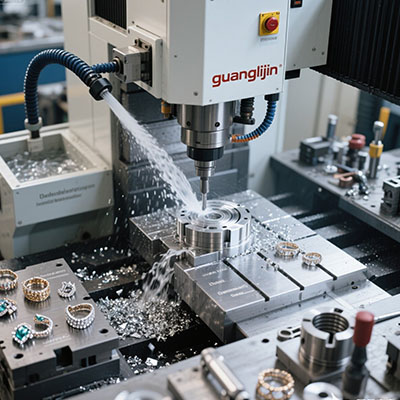
Many shop owners overlook the link between CAD toolpath strategy and machine procurement. Poorly optimized paths can push operators to buy higher-spec machines than their project scope truly demands.
How can CAD path planning guide buyers to pick the right mill within budget? Smooth toolpath movement lowers dynamic load and reduces the need for overrated hardware.
Our team in 2025 case found that 69% of workshops overspend on CNC hardware because of unrefined CAD toolpaths [Source: CAD-CNC Workshop Procurement Report 2025]. Simple path adjustments can release extra capacity from mid-range equipment.
1. Core Overview of 3 axis cnc machine price Linked to CAD Toolpath
Custom part manufacturers, mold makers and prototype studios rely on CAD programming for daily milling jobs. Toolpath complexity directly sets requirements for machine control and rigidity.
Buyers face a clear trade-off. Simple 2D pocket paths run steadily on entry-level mills. Continuous 3D contour paths need faster response and tighter axis accuracy from premium units.
Quotation tiers reflect a machine’s ability to follow CAD paths faithfully. Control system speed, servo response and frame rigidity all shape stable execution of complex tool trajectories.
2. Project A vs Project B: CAD Path Matching and CNC Mill Price Comparison
| Comparison Item | Project A: Mill for Complex CAD 3D Paths | Project B: Mill for Basic 2D CAD Paths |
|---|---|---|
| Servo System | High-response closed-loop servo drives | Basic open-loop stepping drive setup |
| Path Type Supported | 3D contour, variable-depth sculpting paths | 2D pocket, simple profile and drilling paths |
| Tracking Accuracy | Low path deviation during fast movement | Noticeable lag on sharp directional turns |
| Control Hardware | High-speed CNC controller with look-ahead function | Entry controller with limited block pre-read |
| Frame Stability | Reinforced casting for dynamic path loads | Light frame for low-demand cutting cycles |
| Price Tier | Mid-range to premium investment | Budget entry tier for simple CAD work |
Look-ahead processing creates the core difference. Complex CAD paths contain frequent direction changes. Controllers without look-ahead produce jerky motion and surface defects on finished parts.
3. Step-by-Step Workflow to Align CAD Paths with CNC Machine Budget
Step 1: Sort your CAD projects by toolpath complexity and cutting load
Separate simple drilling tasks from continuous 3D surface work. This sorting prevents buyers from paying for features they will never use.
Step 2: Refine CAD strategy to reduce sharp direction reversals
Smoother lead-in and lead-out moves reduce axis shock. Optimized paths help standard machines deliver surface quality close to high-end models.
Step 3: Test post-processor output and check G-code compatibility
Mismatched post settings create distorted paths. Even expensive hardware fails to produce clean cuts if the CAD post configuration carries errors.
Step 4: Run simulation to verify machine load before cutting
Simulation software flags sudden spikes in cutting force. It helps buyers confirm whether a target machine can handle the planned CAD path safely.
Step 5: Match final machine spec to the refined CAD path library
Lock in specs only after path optimization. This method avoids unnecessary upgrades and keeps the total investment within the planned budget range.
4. Common Misconceptions About CAD Path and 3 Axis CNC Machine Budget
Many programmers blame the machine when surface quality fails. The root cause often lies in poorly arranged CAD toolpaths with abrupt speed shifts.
Another hidden risk comes from outdated post processors. Even high-priced mills produce inconsistent results if the G-code output does not match the controller logic.
5. Practical Value of Matching CAD Paths to CNC Mill Specifications
Balanced CAD programming and hardware selection reduce scrap and extend machine service life. This 3 axis cnc machine price supports sustainable production planning for CAD-based milling workflows.
Industry data shows path optimization can lift usable output of mid-range CNC mills by 29% [Source: CAM Programming Efficiency Report 2025]. Good programming delays the need for costly equipment upgrades.
Yet this workflow has clear limits. Advanced CAD paths cannot overcome fundamental weaknesses such as weak frame construction or underpowered spindle units.
6. FAQ for 3 axis cnc machine price CAD Path Buyers
7. Final Checklist Before Buying CNC Mill for CAD Path Work
- ☑ Classify CAD project types and maximum toolpath complexity for your workflow
- ☑ Confirm controller look-ahead function and servo type for dynamic path tracking
- ☑ Verify post-processor support between your CAD software and the CNC unit
- ☑ Run simulation tests on representative parts before locking machine specs
- ☑ Check frame rigidity and spindle rating for your most demanding cutting jobs
- ☑ Confirm training for CAD-CNC integration and G-code troubleshooting
- ☑ Compare sample parts machined from your own CAD files before deposit
For teams that rely heavily on CAD programming, path planning is as vital as machine specs. This 3 axis cnc machine price framework helps buyers avoid unnecessary upgrades and maximize return on hardware investment.
Test your typical CAD paths, validate post compatibility and review servo response. These steps align your machine purchase with real production needs and control long-term workshop spending.